Database Administrators can now create database deployments that use Oracle Database 12c Release 2 (12.2) to host an Oracle Real Application Clusters (RAC) database.
Showing posts with label DBCS. Show all posts
Showing posts with label DBCS. Show all posts
Friday, January 13, 2017
Monday, December 12, 2016
Cloud Stack Manager Console

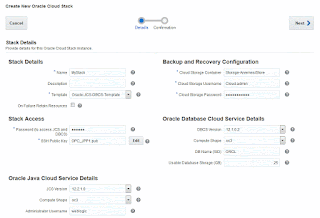 A new Cloud Stack Manager console and template to create both DBCS and JCS in a single operation was introduced in 16.4.5 release
See this tutorial

Sunday, December 11, 2016

Saturday, November 5, 2016

Saturday, July 30, 2016
Database Deployment Using a Cloud Backup
DBAs can now create an Oracle Database Cloud deployment whose database is taken from a cloud backup.
More information:
More information:
Friday, July 29, 2016
DBCS Snapshot
 OPC users can now create snapshots of the Oracle Compute Cloud Service storage volumes that support a Database as a Service database deployment hosting a single-instance database.
These snapshots can be used to create database deployments quickly because their storage is linked to the snapshot’s storage using “copy on write” technology provided by Oracle Compute Cloud Service.
Wednesday, June 15, 2016
Oracle Data Guard configuration

High Availability
The primary and standby database are automatically placed in different availability domains to provide isolation at the infrastructure level.
Disaster Recovery
The primary and standby database are automatically placed in different data centers to provide isolation at the infrastructure level and geographical separation to provide availability in the event of catastrophic events.
Tuesday, June 7, 2016
Create DBCS Instance using REST API
Since my previous post, REST API changed !
The following shows how to create an Oracle Database Cloud Service instance 12g using the REST API:
Documentation:
https://docs.oracle.com/cloud/latest/dbcs_dbaas/CSDBR/op-paas-service-dbcs-api-v1.1-instances-%7BidentityDomainId%7D-post.html#examples
Command:
curl --include --request POST --cacert "D:\Distribs\cacert.pem" --user "user:my_password" --header "X-ID-TENANT-NAME:my_identity_domain" --header "Content-Type:application/json" --data "@D:\OPC_Demo\createMyDB.json" https://dbcs.emea.oraclecloud.com/paas/service/dbcs/api/v1.1/instances/my_identity_domain
Result


createMyDB.json file :
{
"serviceName": "DB12RESTDemo",
"version": "12.1.0.2",
"level": "PAAS",
"edition": "EE",
"subscriptionType": "MONTHLY",
"description": "VM Created using REST API",
"shape": "oc3",
"vmPublicKeyText": "ssh-rsa AAAAB3NzaKvGXmw== rsa-key-20150105",
"parameters": [
{
"type": "db",
"usableStorage": "15",
"adminPassword": "Manager12#",
"sid": "ORCL",
"pdb": "PDB1",
"failoverDatabase": "no",
"backupDestination": "NONE"
}
]
}
}}
The following shows how to create an Oracle Database Cloud Service instance 12g using the REST API:
Documentation:
https://docs.oracle.com/cloud/latest/dbcs_dbaas/CSDBR/op-paas-service-dbcs-api-v1.1-instances-%7BidentityDomainId%7D-post.html#examples
Command:
curl --include --request POST --cacert "D:\Distribs\cacert.pem" --user "user:my_password" --header "X-ID-TENANT-NAME:my_identity_domain" --header "Content-Type:application/json" --data "@D:\OPC_Demo\createMyDB.json" https://dbcs.emea.oraclecloud.com/paas/service/dbcs/api/v1.1/instances/my_identity_domain
Result


createMyDB.json file :
{
"serviceName": "DB12RESTDemo",
"version": "12.1.0.2",
"level": "PAAS",
"edition": "EE",
"subscriptionType": "MONTHLY",
"description": "VM Created using REST API",
"shape": "oc3",
"vmPublicKeyText": "ssh-rsa AAAAB3NzaKvGXmw== rsa-key-20150105",
"parameters": [
{
"type": "db",
"usableStorage": "15",
"adminPassword": "Manager12#",
"sid": "ORCL",
"pdb": "PDB1",
"failoverDatabase": "no",
"backupDestination": "NONE"
}
]
}
}}
Friday, May 20, 2016
Activity Log Page

Wednesday, May 11, 2016
Database Backup & Recovery Configuration

A new backup destination is now available : Cloud Storage Only
With this option, backups are configured to be created automatically and stored on an Oracle Storage Cloud Service container only.
Tuesday, May 10, 2016
Database Backup &recovery through the console
 With the latest release introduced recently, It's now possible to create backups (full backups) and perform recovery using the Oracle Database Cloud Service console
Sunday, May 8, 2016
PaaS Command Line Interface
 Oracle introduced a PaaS Command Line Interface (CLI) that enables users of
Oracle Cloud services to create, monitor and manage their service
instances from a command shell or script.
Oracle introduced a PaaS Command Line Interface (CLI) that enables users of
Oracle Cloud services to create, monitor and manage their service
instances from a command shell or script.Check the documentation to install this tool.
Tuesday, May 3, 2016
Exadata Cloud Service - Quarter Rack - Minimum OCPU

Oracle have recently lowered the minimum CPU requirement to 16 for Exadata quarter rack.
Wednesday, March 30, 2016
VPN for Multitenant
 VPN for Multitenant Compute delivers trusted connectivity services between Oracle Public Cloud and systems On Premises using Corente Services Gateway (CSG).
More information :
- Oracle Website
- Documentation
Wednesday, March 9, 2016
SSH Access

 provides option to add an SSH public key to the service instances.
Monday, January 25, 2016
Backup to Oracle Cloud using Enterprise Manager 13c

Wednesday, January 20, 2016
Monday, January 4, 2016
DBCS & Timezone

Sunday, January 3, 2016

Saturday, January 2, 2016
RAC now available

Selecting 2 OCPU (Trial only) or 4, 8 or 16 OCPU shapes in Service Configuration section will allow Cluster Database creation choice.
Subscribe to:
Posts (Atom)